
Changing history
This page covers cherry-pick, revert, reset, squash, the rebase editor, and moving or dropping commits. Every operation that rewrites history saves a recovery point first, so the Undo panel can put the branch back.
Cherry-pick, revert and reset
Right click a commit in the graph. Select several commits first to act on all of them.
| Action | What it does |
|---|---|
| Cherry-pick | Applies the commit again on top of the current branch, as a new commit. The original stays where it is. |
| Revert | Adds a new commit that undoes the change. Nothing is removed from the history. |
| Reset Current Branch to Here | Moves the branch to this commit. |
Gitkeen checks the repository before it offers these, and says what it found:
| Case | What happens |
|---|---|
| The working tree has uncommitted changes | Cherry-pick and revert are refused, because Git would overwrite your work. |
| Another operation is unfinished | All three are refused until you finish or abandon it. |
| A merge commit is selected | Cherry-pick is off. Revert undoes the merge against its first parent. |
| The commit is already in this branch | Cherry-pick warns that it would repeat the change. |
| The commit is not in this branch | Revert warns that there is nothing here to undo. |
Several commits are cherry-picked oldest first, so they land in the order they were written. They are reverted newest first, which is the order that does not conflict.
Reset
The reset dialog shows what each mode costs:
| Mode | Your files | The index |
|---|---|---|
| Soft | Not changed | The changes of the commits you leave behind stay staged. |
| Mixed | Not changed | Nothing is staged. This is the usual choice. |
| Hard | Made to match the target commit, so uncommitted work is lost | Nothing is staged. |
Before anything moves, the dialog says how many commits leave the branch, whether a remote still has them, and how many files you have not committed. Hard with uncommitted work asks a second time, because no tool can bring uncommitted work back.
Squashing commits
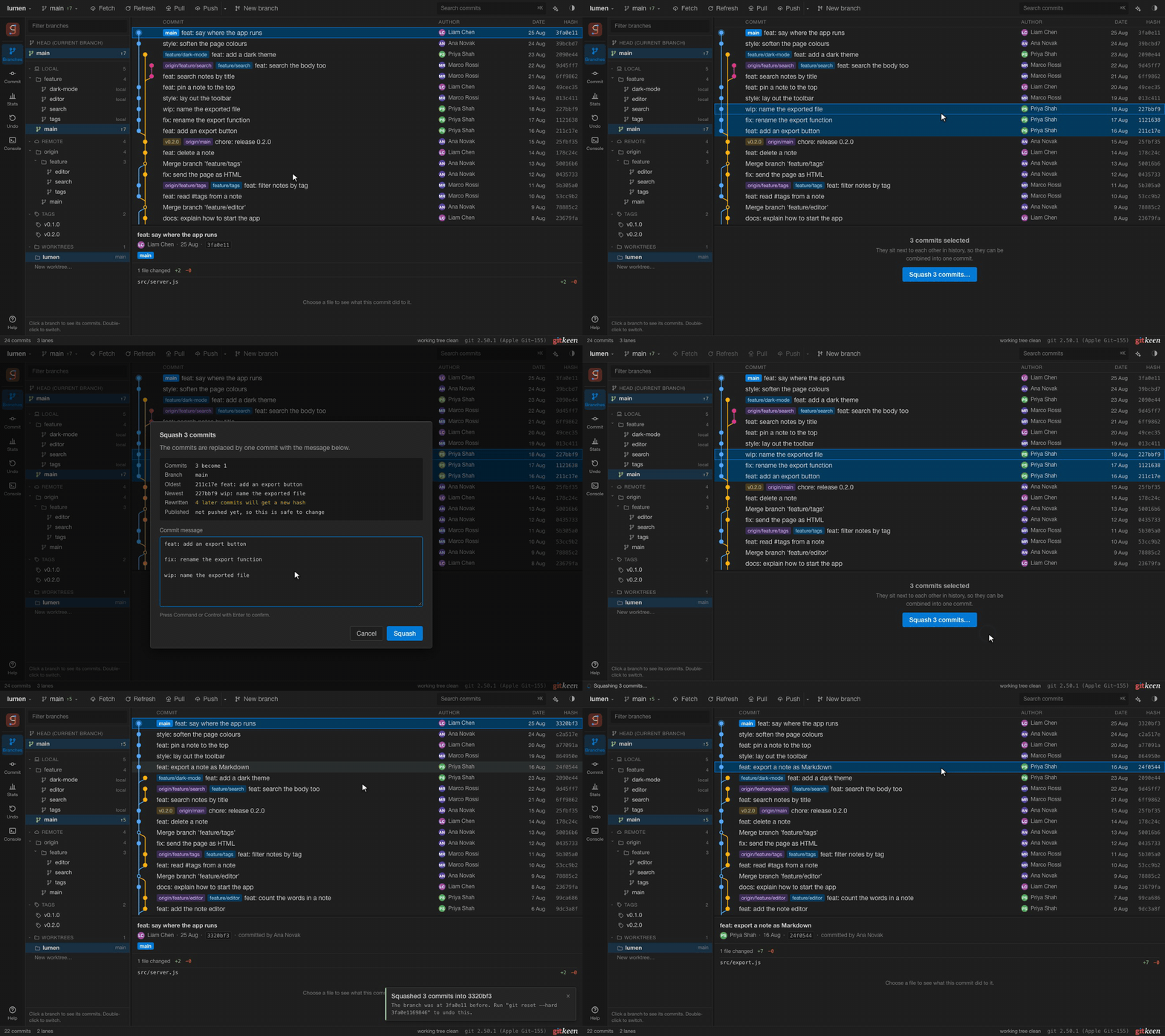
Select two or more commits next to each other, right click, and choose Squash commits. Gitkeen joins their messages, oldest first, and you can edit the result before anything happens.
Gitkeen refuses to squash in these cases, and says which one applies:
| Case | Reason |
|---|---|
| Fewer than two commits | There is nothing to combine. |
| The commits are not on the current branch | There is nothing to rewrite here. Gitkeen names the branches that have them. |
| The commits are not next to each other | Only a continuous run can become one commit. |
| The selection has a merge commit | A merge joins two histories, so it cannot be folded into another commit. |
| The selection has the first commit | It has no parent to build on. |
| The working tree has uncommitted changes | They would end up in the new commit. |
| A rebase or merge is already running | Two history changes at once would collide. |
| A merge sits between the selection and the branch tip | Squashing would flatten that merge. |
A squash cannot conflict. When the selection reaches the tip of the branch, Gitkeen moves the branch back and makes one new commit. Otherwise Git replays the later commits on top of the combined one. Those later commits get new hashes, and the dialog says so before you agree. If the commits are already on a remote, the dialog warns that a force push is needed.
The rebase editor
Right click a commit and choose Rebase from here. Gitkeen opens the todo
list of git rebase -i for that commit and every newer one, as a list you can
edit.
Rows are listed oldest first, the order Git applies them in. This is the opposite of the graph, and the heading says so.
| Command | What it does |
|---|---|
| Pick | Keeps the commit as it is. |
| Reword | Keeps the changes and gives the commit a new message. |
| Edit | Stops the rebase at this commit so you can amend it. |
| Squash | Folds the commit into the one above, and keeps both messages. |
| Fixup | Folds the commit into the one above, and throws its message away. |
| Drop | Removes the commit and its change. |
Drag a row by its grip (⋮⋮) to move it, or use the arrows on the row. A dropped row stays in the list, greyed and struck through, so the list does not jump while you work. A folded row is indented under the commit it joins.
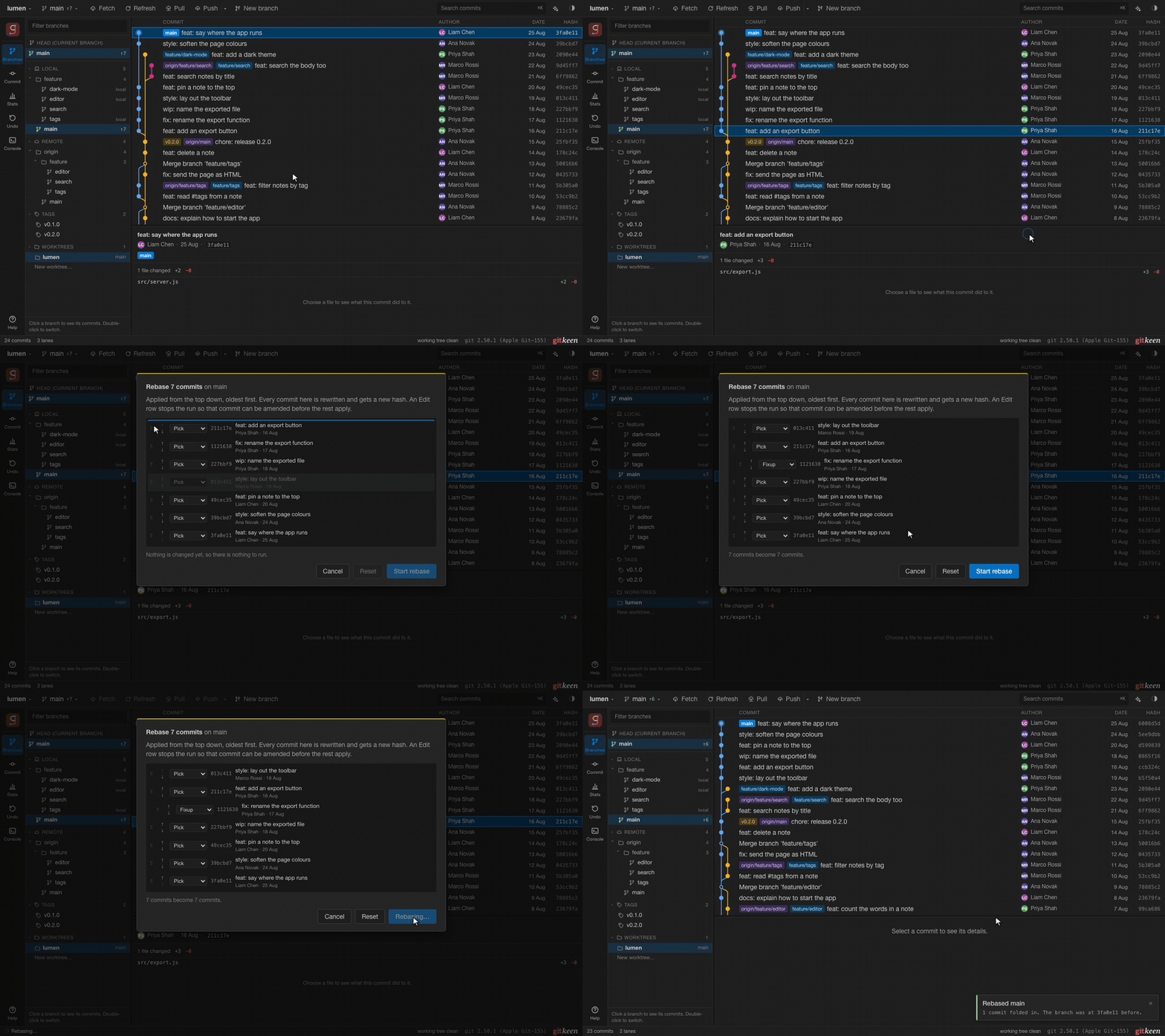
Nothing runs until you press Start rebase. Cancel costs nothing, and Reset puts every row back as it was. Gitkeen will not start a rebase that changes nothing, drops every commit, or folds the oldest commit into nothing. It says what is wrong below the list.
Edit stops
At an Edit row the rebase stops, and the status bar shows it as paused. Change the commit’s files in your editor, or write a new message for it in Gitkeen. Continue in the status bar adds your changes to the commit and runs the rest of the plan. Abandon puts the branch back as it was.
| Change | Does Continue add it? |
|---|---|
| A new message written for the Edit row | Yes |
| Edits to files Git already tracks | Yes, staged or not |
| A new file you staged | Yes |
| A new file you did not stage | No. It stays untracked. |
If you make commits of your own while the rebase is paused, for example to split the commit in two, Continue keeps them as they are and amends nothing.
If a commit does not apply cleanly, the rebase stops on the conflict. Resolve it in the merge editor and press Continue.
Moving and dropping commits
For a single change, the commit menu is quicker than the rebase editor:
| Action | What it does |
|---|---|
| Move up, Move down | Moves the commit one place towards or away from the tip. |
| Drop commit | Removes the commit and its change. |
Dropping is not reverting, and the dialog says so. A revert adds a commit that undoes the change, so the history records both. A dropped commit disappears from the history.
Every commit after the one you change is replayed and gets a new hash. The dialog says how many, and warns you when any are already pushed. If the commits cannot be replayed in the new order, Gitkeen stops and puts the branch back as it was. You are never left in a half-finished rebase.
Gitkeen does not move or drop a merge commit, or any commit with a merge between it and the tip of the branch. Replaying commits across a merge would flatten it into a straight line, and the record of the merge would be lost. The rebase editor follows the same rule.